Business- technology - Educational- Politics -Software

Showing posts with label Programmings. Show all posts

Friday, November 29, 2019

Introduction on loops in PowerShell by rkp

PowerShell

 Introduction on loops in PowerShell :

We will always need loops if we have something  repetitive  work ,In loop we run a piece
 of code or any statement on a repetitive basis .One real example ,suppose in a school there
 are 20000 students and because of some reason university decided to give 5 marks extra for
 examinations to every student . So the university has decided to give this 5 marks to every
 student except those whose attendance is less than 100 days . Now you just assume how staff
 will do it , they will have to check every student marks and attendance of the year . But Same
 thing with the help of Any loop it could have been done very easily , by creating an array of
 students with their marks and attendance dates .Here by using loop we are able to save extra efforts .
Types of  loops in PowerShell :
There are many ways to run loop in PowerShell , but it always depends on your requirements and
 feasibility of program ,for example if you want to execute at least once for any array than we should
 use do while loop else there are for loop and foreach which are good.Types and their examples are
 given below.

While

While statement takes a condition as argument and execution of statement inside a while loop depends
 on the condition, that means if condition is success than it will execute statement else not.
Syntax,
while(condition)
{
    Statement 1
    Statement 2
    ….
}
Example ,
$j = 0 
while($j -lt 10)
{
    Write-Output $j
    $j++ }
Below is the screen for above code execution ,

Do While

Do while is similar to while loop only difference is it will execute at least once , that means it will execute do block for the first time and while block if condition is true.In the below syntax do block executed for first time for sure .
  • Do :This block execute for first and once when execution
     starts .
  • while : Execution of statement 1 and statement 2 totally
     depends on the success of condition;
Syntax ,
Do
{
Statement 1
Statement 2
….}while(condition){
Statement 3
Statement 4
…..
}
Example 1,
$j = 0
do
{
    Write-Output $j 
    $j++
}while($j -lt 10)
Example 2,
In this example do block will execute for the first time even condition was not true .

$j = 0
do
{
    Write-Output $j
    $j--
}while($j -gt 0)

Below screen for both programs is is given ,

Do Until

Do until is little different than do while , in do until execution will continue till return negative result
 by “until block”.two things are major here.
  • Do :This block will keep executing until block condition get
     failed , that means until block
    return a negative value .
  • until :Do block statement 1 and statement 2 execute until conditions
    return negative results .

Syntax,


do
{
    Statement 1
    Statement 2
    ….
}until(condition)

Example,

$i = 0

do
{
    Write-Output $i
    $i++
}until($i -ge 5)

In “do until” block we can see execution of do block will continue till “until block”
condition is returning positive value.

For,
The for statement runs a statement list zero or more times based on an initial setting. 
In the below syntax
 of for loop there are three important sections .
  • Initialisation section : In this section it assigned initial value for any variable ,
     this section runs once for the first time .
  • Condition : In condition parts , we write our condition for which loop will run ,
     that means execution of statement block always depends on the success
     of condition parts, if condition is true than statement block will execute else not .
  • Operation : In this block we can increase , decrease or change the value
     of initialize variable or any things according to our requirements .
Syntax,
for($initialisation; condition; operation)

{
    Statement 1
    Statement 2
    ….
}
Example 1,
for($i = 0; $i -lt 3; $i++)
{
    Write-Output $i
}
Output screen of above code ,

Many times one for loop is not enough to complete our requirements , so we can use nested for loops We should try to avoid nesting of loops as their time complexity may go very high if not handled
 properly .Below is an example of nested for loop .
Example 2,
for($j = 0; $j -lt 3; $j++)
{
    $line = ''
    for($j = 0; $j -lt 3; $j++)
    {
        $line += $j.ToString() + $j.ToString() + '  '
    }
    Write-Output $line
}

Output =00  11 22

ForEach

“Foreach” runs statement blocks for consecutive time till last item of an array .Good things about
 forEach statement is ,we do not have to write any seperate code to extract array of items.
In general “foreach” is a optimized version of “for” loop which giving inner item of array without
 writing any programs .Here ,it simply checks for item inside array on which we are running “foreach” loop if any item is there it will execute statement 1 and statement 2 blocks .
Syntax ,
foreach($arrayItems)
{
    Statement 1
    Statement 2
    …..
}
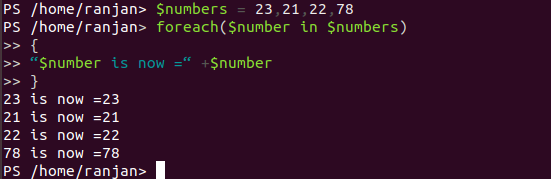
Example ,
$numbers = 23,21,22,78
foreach($number in $numbers)
{
“$number is now =“ +$number
}
Below screen show above executions ,

Benefits of loops in PowerShell :

Biggest benefits of using loop is , it reduces too much manual work also it is very good to control
 big size of data for similar type of activity on it. Let’s say I want you to print 1 to 1000000 and I told
 you that you can add 1 to every number divisible by 2 , which is an even number .
Then if you start printing one by one and try to add 1 to every even number it will take too much time .
 So, a better and easy way you suggested was just repeat this process of adding one to the number until
 we reach 1000000. Biggest benefits we are getting from loop is we are reusing the same piece of code,
 we do not required to write the same code for lakhs of data it will automatically execute code till the end.
Below are few points of benefits
  •  Increase code reusability ,which makes code smaller
  •  Faster calculation for big data , saving a lot of manual labor
  •  Redundancy of code is less.
 
An example with its benefits   , 
Question : print upto 1000 .
Without loop,

Write-Output 1;
Write-Output 2;
Write-Output 3;
Write-Output 4;

…so on
Till 100

With loop,
$x=1..100
foreach($y in $x){
Write-Output $y;
}

Conclusion:
To conclude, So we learned that loops are very powerful tool to utilize the same code with less work.


Logical Operators in PowerShell by rkp .

Logical Operators in PowerShell

Introduction to logical operators:


We have seen many conditions in if statement ,

like if($j -lt 10) ,But if we wanted to check multiple conditions at once
,for example $j -lt 10 and $i -lt 15 .So we have logical operators
to tackle these kind of situation. Logical operators combine two
or more expressions and statements together . In very simple words
if we wanted to convert multiple conditions in a single condition
than we can use logical operators .Let us call Logical Operator
with name of LO for syntax .

Syntax,
if(cond1 LO1 cond2  LO2 cond3){
    Statement 1
    Statement 2
    ...
}


So in above syntax (cond1 LO1 cond2 LO2 cond3) combined to
make one condition.In the above syntax
(cond1 LO1 cond2 LO2 cond3)=single condition . As it will return
single value combination of multiple conditions .

Example ,

In this example we are combining three conditions all ,
($a -gt $b) =one condition, (($a -lt 20) -or ($b -lt 20))=one condition by two
combination and ($a -gt $b) -and (($a -lt 20) -or ($b -lt 20)) =one condition,
by a combination of all three we are getting one single condition .
So if all of these conditions will be true then only output
“all combined conditions are true” will be shown .

$a =14
$b=12
if(($a -gt $b) -and (($a -lt 20) -or ($b -lt 20))
){
Write-Output “all combined conditions are true”
}

In this example we are combining three conditions all ,($a -gt $b) =one condition,

(($a -lt 20) -or ($b -lt 20))=one condition,($a -gt $b) -and (($a -lt 20) -or ($b -lt 20)) =one condition,
by a combination of all three we are getting one single condition .
Here we can see we are combining all three conditions to form a single condition , their output will be single .

$a =20
$b=21
if(($a -gt $b) -and (($a -lt 20) -or ($b -lt 20))
){
Write-Output “all combined conditions are true”
}else{
Write-Output “all combined conditions are false”

}

List of Logical Operators :

There are 4 main logical operators in PowerShell ,they are “and”, “or”,”xor”,”not=(!)”.
let us discuss each with example in brief .
-and:-and is called as Logical and ,output of any logical and is True if $a and $b are True otherwise False ,below are some examples for logical and operators
$a -and $b //false (if both are false)
$a -and $b //false (if any one of them is false)
$a -and $b //true (if both of them are true).

So basically logical and operator true only when both true . Screen for execution of the above examples

are given below .


In general and operators used were we want all conditions should full fill .
For example suppose In a class teacher decided to allow for exams only
those students whose attendance is more than 100 and also they paid class fee .
So here both conditions need to full fill .

$attendance =101
$paid =”yes”
if($attendance -gt 100 -and $paid -eq “yes”){
Write-Output “Allow him for examination”
}


We can also test this program by passing different inputs value
of $attendance and $paid .
-or:Logical or ,False if $a and $b are False, otherwise True.
some examples are given below.


$a -or $b //false(if both are false)
$a -or $b //true (if any one of them is true)
$a -or $b //true (if both of them are true).

So basically logical and operator false only when both false . Screen for execution of the above examples are given below .


In general or operators are used when we want to consider any condition is true .like students having attendance more than 100 will get 5 marks extra or
the student who score more than 200 marks .

$attendance =101
$marks =201
if($attendance -gt 100 -or $marks -gt 200){
Write-Output “give 5 marks extra”
}


We can also test this program by passing different inputs value of

$attendance and $paid .
-xor:Logical exclusive or ,
True if either $a or $b is True,otherwise False.
(‘a’ -eq ‘A’) -xor (‘a’ -eq ‘z’) //true as one of them is true
(‘a’ -eq ‘A’) -xor (‘Z’ -eq ‘z’)//false as one of them is false
(‘a’ -eq ‘s’) -xor (‘Z’ -eq ‘p’) //false as both of them are false
Below screen show output of the above example ,

-not:Logical not ,True if $a is False, otherwise False.
-not (‘a’ -eq ‘a’) //false as output of expression is true
-not (‘v’ -eq ‘a’)// true as output expression is false
-not (‘v’ -eq ‘V’) //false as output expression is true
-not (‘V’ -eq ‘V1’) //true as output expression is false
Screen for above example is given below ,

!:! Operator is same as that of the the -not operator .
Simply ! operator converts true to false and false to true .

!(‘a’ -eq ‘a’) //false as output of expression is true
!(‘v’ -eq ‘a’)// true as output expression is false
!(‘v’ -eq ‘V’) //false as output expression is true
!(‘V’ -eq ‘V1’) //true as output expression is false

Screen for above example is given below ,


Note :In PowerShell always use $TRUE and $FALSE for true and false value ,
if you will use true and false they will not consider as Boolean value .

$a =false
$b=true

!$a //true
!($b) //true
$a=$false
$b=$true
!($a) //true
!($b) //false

Screen for above example is given below,


Some real world examples with mixing all operators together ,
Suppose our server and database is running and we want
implements certain check were it will check all the time if server
and database are running or not .

if($server -eq “running” -and $database -eq “running”){
Write-Output “server is running and database is running”
}elseif($server -eq “not running” -and $database -eq “running”){
Write-Output “server is not running and database running
}elseif($server -eq “running” -and $database -eq “not running”){
Write-Output “server is running and database not running”
}else{
Write-Output “server and database both are not running”
}


1st input:
$server =”not running”;
$database =”running”
2ND input:
$server =”running”;
$database =”not running”


Conclusion:
To conclude, Without logical operator our programing will be blank ,

because of logical operators only we are able to write situational code ,

we are able to deal with different conditions.


Saturday, November 23, 2019

Power Shell introduction and if condition lesson 1.

PowerShell
Introduction : PowerShell is a way to write Administrative commands on Windows environments , it is similar to bash scripting in Linux .It provides a way to automate the Windows operating system and its applications to deal with various tasks .PowerShell is available for both Windows and Linux operating systems, but in this tutorial we are focusing toward windows . In the below image we can see how Powershell controls all Automation works.

if statement in PowerShell

Introduction: The if statement allows the programmer to control the flow of execution of program ,”IF” statement defines if a program has to execute a section of code or not , based on whether a given condition expression is correct or not .Here correct in programming terms  true or false. One of the main uses of if statement it allow program to take decision on the basis of one or more conditions. An if statement is based on the boolean value , if the boolean condition value is true than inside the if block and execute the lines of statements inside if block .In another simple word , To execute any statements  it has to test one or multiple conditions if conditions are true it will execute the statement . “If” statement needed when we wanted to check any specific case.
Syntax : 
Syntax of if in PowerShell is very much similar to other programming languages . It checks for condition ,if the condition expression is true it will got to if block , if the condition expression is false it will go to else .

if(condition) {

   // Executes when the condition is true

}else {

   // Executes when the condition is false

}

We can also use elseif , syntax below.

if(condition 1) {

   // Executes when the condition 1 is true

}elseif(condition 2) {

   // Executes when the condition 2 is true

}elseif(condition 3) {

   // Executes when the condition 3 is true

}else {

   // Executes none of the condition is true.

}

Flow diagram : 
In the below flow diagram we can see when execution start , it first checks condition if condition is true than it will go to statement block .Here conditions can be one or multiple . Any condition other than zero , false , blank are considered as true only .for example if any conditional expression gives output of 0,”” , false all these are considered as false statements .


How if statement in PowerShell:
if (<cond1>)

    {<statement1>}

[elseif (<cond2>)

    {<statement2>}]

[else

    {<statement3>}]
Here, when it starts execution it checks for cond1 as if  it is true or false , based on the value it will execute the statement block , if cond1 is true it will execute statement1 and PowerShell exit. But if cond1 is false , then it will check else if block cond2 ,if cond2 is true than statement2 will be executed .If cond1 and cond2 both are false or none of condition is true than else statement will be executed .

Condition can be one or multiple, for example .
if (<condition 1 -or condition 2>)

    {<statement1>}

[elseif (<condition 3 -or condition 4>)

    {<statement2>}]

[else

    {<statement3>}]

Examples :
Simple if else example,
$x = 40

if($x -le 20){

write-host("value of x is not less than 20")

}else{

write-host(“value of x is greater than 20”)

}


Output:  value of x is greater than 20

Explanation : Above code is checking the value of $x , if it is less than 20 or not , if value of $x is less than 20 it will execute if statement block .

Example with Multiple conditions ,

$day = (get-date).dayofweek

if(($day -ne "Saturday") -or ($day -ne "Sunday")){

write-host("Welcome to Our Banks")

}else{

write-host(“Hello friends , Banks are closed today”)

}

Explanation : Above code will print output according to day .Here -ne matches case the value of $day , so if day is Sunday or Saturday , it will print  "Hello friends , Banks are closed today" and if it’s other than Sunday and Saturday it will print “Welcome to Our Banks”.
Example with if else if conditions ,
$occupation =”engineering”

if($occupation -eq "engineering"){

write-host("engineer")

}elseif($occupation -eq "sales"){

write-host("sales")

}else{

write-host("accounting")

}

Explanation: In the above code it checks for $occupation value , if it is equal to engineering than print engineering ,if value if $occupation is sales than it will print sales, and if $occupation is none than it will print accounting.

functional based example,

 function check ($VALUE) {

 if ($VALUE) {

     Write-Host(“TRUE”)

 } else {

     Write-Host(“FALSE”)

 }

 }

Calling function ,
check $FALSE

FALSE

check TRUE //TRUE is a string length >0

TRUE

check FALSE //FALSE is a String with length > 0.

TRUE

NOTE:In PowerShell String with length more than zero is considered as true .

Explanation : In the above example first it calls for check function with parameter  $TRUE , and inside function check , it checks for $VALUE and if it is true it will print TRUE , in similar way again check called with parameter $FALSE and it check $VALUE and as it is false it will go to the else block .

With the above example we are clear that if statement can play a very crucial role in real software world .
Conclusion
PowerShell IF is a very powerful tool to handle conditional statements ,I hope I was able to simplify IF in PowerShell.