Business- technology - Educational- Politics -Software

Friday, November 29, 2019

Introduction on loops in PowerShell by rkp

PowerShell

 Introduction on loops in PowerShell :

We will always need loops if we have something  repetitive  work ,In loop we run a piece
 of code or any statement on a repetitive basis .One real example ,suppose in a school there
 are 20000 students and because of some reason university decided to give 5 marks extra for
 examinations to every student . So the university has decided to give this 5 marks to every
 student except those whose attendance is less than 100 days . Now you just assume how staff
 will do it , they will have to check every student marks and attendance of the year . But Same
 thing with the help of Any loop it could have been done very easily , by creating an array of
 students with their marks and attendance dates .Here by using loop we are able to save extra efforts .
Types of  loops in PowerShell :
There are many ways to run loop in PowerShell , but it always depends on your requirements and
 feasibility of program ,for example if you want to execute at least once for any array than we should
 use do while loop else there are for loop and foreach which are good.Types and their examples are
 given below.

While

While statement takes a condition as argument and execution of statement inside a while loop depends
 on the condition, that means if condition is success than it will execute statement else not.
Syntax,
while(condition)
{
    Statement 1
    Statement 2
    ….
}
Example ,
$j = 0 
while($j -lt 10)
{
    Write-Output $j
    $j++ }
Below is the screen for above code execution ,

Do While

Do while is similar to while loop only difference is it will execute at least once , that means it will execute do block for the first time and while block if condition is true.In the below syntax do block executed for first time for sure .
  • Do :This block execute for first and once when execution
     starts .
  • while : Execution of statement 1 and statement 2 totally
     depends on the success of condition;
Syntax ,
Do
{
Statement 1
Statement 2
….}while(condition){
Statement 3
Statement 4
…..
}
Example 1,
$j = 0
do
{
    Write-Output $j 
    $j++
}while($j -lt 10)
Example 2,
In this example do block will execute for the first time even condition was not true .

$j = 0
do
{
    Write-Output $j
    $j--
}while($j -gt 0)

Below screen for both programs is is given ,

Do Until

Do until is little different than do while , in do until execution will continue till return negative result
 by “until block”.two things are major here.
  • Do :This block will keep executing until block condition get
     failed , that means until block
    return a negative value .
  • until :Do block statement 1 and statement 2 execute until conditions
    return negative results .

Syntax,


do
{
    Statement 1
    Statement 2
    ….
}until(condition)

Example,

$i = 0

do
{
    Write-Output $i
    $i++
}until($i -ge 5)

In “do until” block we can see execution of do block will continue till “until block”
condition is returning positive value.

For,
The for statement runs a statement list zero or more times based on an initial setting. 
In the below syntax
 of for loop there are three important sections .
  • Initialisation section : In this section it assigned initial value for any variable ,
     this section runs once for the first time .
  • Condition : In condition parts , we write our condition for which loop will run ,
     that means execution of statement block always depends on the success
     of condition parts, if condition is true than statement block will execute else not .
  • Operation : In this block we can increase , decrease or change the value
     of initialize variable or any things according to our requirements .
Syntax,
for($initialisation; condition; operation)

{
    Statement 1
    Statement 2
    ….
}
Example 1,
for($i = 0; $i -lt 3; $i++)
{
    Write-Output $i
}
Output screen of above code ,

Many times one for loop is not enough to complete our requirements , so we can use nested for loops We should try to avoid nesting of loops as their time complexity may go very high if not handled
 properly .Below is an example of nested for loop .
Example 2,
for($j = 0; $j -lt 3; $j++)
{
    $line = ''
    for($j = 0; $j -lt 3; $j++)
    {
        $line += $j.ToString() + $j.ToString() + '  '
    }
    Write-Output $line
}

Output =00  11 22

ForEach

“Foreach” runs statement blocks for consecutive time till last item of an array .Good things about
 forEach statement is ,we do not have to write any seperate code to extract array of items.
In general “foreach” is a optimized version of “for” loop which giving inner item of array without
 writing any programs .Here ,it simply checks for item inside array on which we are running “foreach” loop if any item is there it will execute statement 1 and statement 2 blocks .
Syntax ,
foreach($arrayItems)
{
    Statement 1
    Statement 2
    …..
}
Example ,
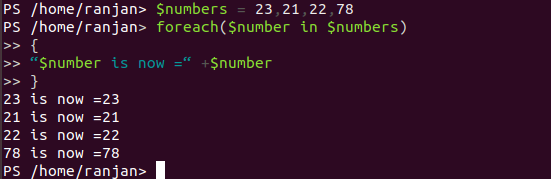
$numbers = 23,21,22,78
foreach($number in $numbers)
{
“$number is now =“ +$number
}
Below screen show above executions ,

Benefits of loops in PowerShell :

Biggest benefits of using loop is , it reduces too much manual work also it is very good to control
 big size of data for similar type of activity on it. Let’s say I want you to print 1 to 1000000 and I told
 you that you can add 1 to every number divisible by 2 , which is an even number .
Then if you start printing one by one and try to add 1 to every even number it will take too much time .
 So, a better and easy way you suggested was just repeat this process of adding one to the number until
 we reach 1000000. Biggest benefits we are getting from loop is we are reusing the same piece of code,
 we do not required to write the same code for lakhs of data it will automatically execute code till the end.
Below are few points of benefits
  •  Increase code reusability ,which makes code smaller
  •  Faster calculation for big data , saving a lot of manual labor
  •  Redundancy of code is less.
 
An example with its benefits   , 
Question : print upto 1000 .
Without loop,

Write-Output 1;
Write-Output 2;
Write-Output 3;
Write-Output 4;

…so on
Till 100

With loop,
$x=1..100
foreach($y in $x){
Write-Output $y;
}

Conclusion:
To conclude, So we learned that loops are very powerful tool to utilize the same code with less work.


Logical Operators in PowerShell by rkp .

Logical Operators in PowerShell

Introduction to logical operators:


We have seen many conditions in if statement ,

like if($j -lt 10) ,But if we wanted to check multiple conditions at once
,for example $j -lt 10 and $i -lt 15 .So we have logical operators
to tackle these kind of situation. Logical operators combine two
or more expressions and statements together . In very simple words
if we wanted to convert multiple conditions in a single condition
than we can use logical operators .Let us call Logical Operator
with name of LO for syntax .

Syntax,
if(cond1 LO1 cond2  LO2 cond3){
    Statement 1
    Statement 2
    ...
}


So in above syntax (cond1 LO1 cond2 LO2 cond3) combined to
make one condition.In the above syntax
(cond1 LO1 cond2 LO2 cond3)=single condition . As it will return
single value combination of multiple conditions .

Example ,

In this example we are combining three conditions all ,
($a -gt $b) =one condition, (($a -lt 20) -or ($b -lt 20))=one condition by two
combination and ($a -gt $b) -and (($a -lt 20) -or ($b -lt 20)) =one condition,
by a combination of all three we are getting one single condition .
So if all of these conditions will be true then only output
“all combined conditions are true” will be shown .

$a =14
$b=12
if(($a -gt $b) -and (($a -lt 20) -or ($b -lt 20))
){
Write-Output “all combined conditions are true”
}

In this example we are combining three conditions all ,($a -gt $b) =one condition,

(($a -lt 20) -or ($b -lt 20))=one condition,($a -gt $b) -and (($a -lt 20) -or ($b -lt 20)) =one condition,
by a combination of all three we are getting one single condition .
Here we can see we are combining all three conditions to form a single condition , their output will be single .

$a =20
$b=21
if(($a -gt $b) -and (($a -lt 20) -or ($b -lt 20))
){
Write-Output “all combined conditions are true”
}else{
Write-Output “all combined conditions are false”

}

List of Logical Operators :

There are 4 main logical operators in PowerShell ,they are “and”, “or”,”xor”,”not=(!)”.
let us discuss each with example in brief .
-and:-and is called as Logical and ,output of any logical and is True if $a and $b are True otherwise False ,below are some examples for logical and operators
$a -and $b //false (if both are false)
$a -and $b //false (if any one of them is false)
$a -and $b //true (if both of them are true).

So basically logical and operator true only when both true . Screen for execution of the above examples

are given below .


In general and operators used were we want all conditions should full fill .
For example suppose In a class teacher decided to allow for exams only
those students whose attendance is more than 100 and also they paid class fee .
So here both conditions need to full fill .

$attendance =101
$paid =”yes”
if($attendance -gt 100 -and $paid -eq “yes”){
Write-Output “Allow him for examination”
}


We can also test this program by passing different inputs value
of $attendance and $paid .
-or:Logical or ,False if $a and $b are False, otherwise True.
some examples are given below.


$a -or $b //false(if both are false)
$a -or $b //true (if any one of them is true)
$a -or $b //true (if both of them are true).

So basically logical and operator false only when both false . Screen for execution of the above examples are given below .


In general or operators are used when we want to consider any condition is true .like students having attendance more than 100 will get 5 marks extra or
the student who score more than 200 marks .

$attendance =101
$marks =201
if($attendance -gt 100 -or $marks -gt 200){
Write-Output “give 5 marks extra”
}


We can also test this program by passing different inputs value of

$attendance and $paid .
-xor:Logical exclusive or ,
True if either $a or $b is True,otherwise False.
(‘a’ -eq ‘A’) -xor (‘a’ -eq ‘z’) //true as one of them is true
(‘a’ -eq ‘A’) -xor (‘Z’ -eq ‘z’)//false as one of them is false
(‘a’ -eq ‘s’) -xor (‘Z’ -eq ‘p’) //false as both of them are false
Below screen show output of the above example ,

-not:Logical not ,True if $a is False, otherwise False.
-not (‘a’ -eq ‘a’) //false as output of expression is true
-not (‘v’ -eq ‘a’)// true as output expression is false
-not (‘v’ -eq ‘V’) //false as output expression is true
-not (‘V’ -eq ‘V1’) //true as output expression is false
Screen for above example is given below ,

!:! Operator is same as that of the the -not operator .
Simply ! operator converts true to false and false to true .

!(‘a’ -eq ‘a’) //false as output of expression is true
!(‘v’ -eq ‘a’)// true as output expression is false
!(‘v’ -eq ‘V’) //false as output expression is true
!(‘V’ -eq ‘V1’) //true as output expression is false

Screen for above example is given below ,


Note :In PowerShell always use $TRUE and $FALSE for true and false value ,
if you will use true and false they will not consider as Boolean value .

$a =false
$b=true

!$a //true
!($b) //true
$a=$false
$b=$true
!($a) //true
!($b) //false

Screen for above example is given below,


Some real world examples with mixing all operators together ,
Suppose our server and database is running and we want
implements certain check were it will check all the time if server
and database are running or not .

if($server -eq “running” -and $database -eq “running”){
Write-Output “server is running and database is running”
}elseif($server -eq “not running” -and $database -eq “running”){
Write-Output “server is not running and database running
}elseif($server -eq “running” -and $database -eq “not running”){
Write-Output “server is running and database not running”
}else{
Write-Output “server and database both are not running”
}


1st input:
$server =”not running”;
$database =”running”
2ND input:
$server =”running”;
$database =”not running”


Conclusion:
To conclude, Without logical operator our programing will be blank ,

because of logical operators only we are able to write situational code ,

we are able to deal with different conditions.


Git branching strategy and solutions to branch merging issue .

Git common problems and their solutions :

Git strategy

Branching Strategies:
If you want to have a smooth development cycle than you must have a good branching Strategies. A good Branching strategies helps team to develop their codes without any conflicts and while pushing for release  . Changes to the branch don't affect other developers until the developer or team has tested the changes and decides to merge the code. Developers can still pull down changes from other developers to collaborate on features and ensure their private branch doesn’t diverge too far from the main code line. different organizations uses different branching strategies  but there are few very frequent way to do branching , they are given below .
  1. No branching Strategies:In this case there will not be any branch all developers will work on the same central repository and they can merge their branches with central branches after proper testing.This type of strategies mostly followed in smaller team were internal testing is very good and all developers are working in sync .

    For any larger team this strategies will work very well , because if any bug and issue will be there in any merge it will be very hard to fixed it and find the proper solution for it . Many time it take too much time to release a small feature . Any larger team or team which seats globally should avoid this strategies .
  2.  Release Branching: This strategies is most common , in this strategies there will be a release branch taken from live branch that may be master branch , and all developers will work on this branch till next release . Only problem with this branch if scrum go longer than two week than it will be very hard to manage .We should only go with if we have very smaller release and scrum should be of 2 week maximum .
    This strategy is most commonly used in waterfall and Scrummerfall development processes.
  3. Feature Branching:This branching strategies are very good for faster and smoother development cycles . In this every developers makes a branch with name of their feature for example user_name , and once testing done with this branch developer can merge their branches with master branch.Again if proper understanding not maintained during development this strategies can also be go like Release branching , if time for release go very longer and changes are getting bigger and bigger.
  4. Story or Task Branching:In this every branch is associated with a task on id , which means managers can divide story into multiple branches and can with associate each branch with some task of any big story.In this strategies managers can release very frequently as he can divide task into smallest part and can assign this task to some branch . These branches are completely independent of other task so can be independently releases .
 Merging Strategies
  1. Merging is very important in git , as many time because of code conflict features did not reflect properly and testers keep blaming , and this could lead to delay in already developed features .merging can be done by mutual code review .Many organization try to make more and more repose and smaller code as in such situations there are very less possibility for code conflict .In some cases developers keep updating their work within the team  so that others will aware of upcoming conflict.

  2. Some basic tricks to merge branches and code:
    1.  Suppose there are many commits  on the branch which we are planning to merge and many of the commits are not clear .
      Solution .we can use cherry pick also in cherry pick we go to the git commit logs and select the the commit id’s and merge those id’s with with branch.
      Let's take an example,
      Master branch =>master
      Feature branch=>feature_branch
      Git checkout feature_branch
      git log --author="Jon"
      Log1_id
      Log2_id
      Log3_id
      Here we are looking at each commit of user Jon and we can ask him to which commit need to go live and which one not .
      Next things we need to do cherry-pick
      git checkout master
      Git cherry-pick Log1_id
      Git cherry_pick Log2_id
      And here we have merged two logs.

Monday, November 25, 2019

एयर इंडिया, बीपीसीएल और अन्य कंपनी के निजीकरण का विश्लेषण।

एयर इंडिया, बीपीसीएल और अन्य कंपनी के निजीकरण का विश्लेषण।


नमस्कार दोस्तों, कैसे हो आप ।
आज हम सरकारी संगठनों के निजीकरण पर चर्चा करने जा रहे हैं। निजीकरण के दो पक्ष हैं, एक अच्छा है और दूसरा बुरा है। आइए हम पहले अच्छी चीजों के बारे में चर्चा करें।

निजीकरण के बारे में अच्छी बातें: 
सरकारी कंपनी के निजीकरण के बारे में कुछ अच्छी बातें। अंक नीचे दिए गए हैं।

  • हम जानते हैं कि किसी भी निजी कंपनी का मुख्य उद्देश्य लाभ कमाना है, क्योंकि अगर उन्हें लाभ मिलेगा, तो वे अपने कर्मचारी को वेतन का भुगतान कर सकते हैं, इसलिए वे सभी सरकारी कंपनी जो अच्छा नहीं कर रही हैं, अच्छा प्रदर्शन करना शुरू कर देंगी क्योंकि कंपनी का कर्मचारी गंभीर होगा,
    क्योंकि वे तेजी से निर्णय लेते हैं और कर्मचारियों द्वारा कोई रिश्वत नहीं ली जाएगी।
  • उदाहरण के लिए, DR-DO की कई परियोजनाएँ विफल हो गई हैं। जापान रेलवे का एक उदाहरण लें, उन्होंने उचित नियोजन के साथ अपने रेलवे को निजी बनाया और उन्होंने अपने रेलवे को ज़ोन का आधार वितरित किया और साथ ही उनके पास बहुत सख्त कानून हैं, ताकि कीमतें न्यूनतम हों और गरीब भी कीमत चुका सकें।
  • सरकारी संगठन में लोग आलसी होते हैं क्योंकि उन्हें पता होता है कि कोई उन्हें नौकरी से नहीं निकाल सकता है। यदि संगठन अच्छा प्रदर्शन नहीं कर रहा है और पैसा नहीं कमा रहा है तो भी सरकार अन्य निजी कर्मचारियों से टैक्स लेकर उन्हें भुगतान करेगी। इसलिए वे कुछ पूरा करने के लिए बहुत प्रयास नहीं करते हैं।
  • निजीकरण का मुख्य लक्ष्य कंपनियों के बीच एक प्रतिस्पर्धात्मक वातावरण स्थापित करना है और हम जानते हैं कि प्रतियोगिताओं की वजह से कीमत कम होगी और सेवाओं में वृद्धि होगी। क्योंकि हर एक बेहतर सेवा देने की कोशिश करेगा और इस दृष्टिकोण में प्रत्येक कंपनी के पास शीर्ष और सर्वश्रेष्ठ प्रौद्योगिकी होगी। और इसलिए अन्य देश उस कंपनी से भी उत्पाद खरीदना पसंद करेंगे।

निजीकरण के बारे में बुरी बातें:
कुछ नकारात्मक बातें भी हैं अगर हम सभी सरकारी कंपनी को निजी बनाते हैं। अंक नीचे दिए गए हैं।
  • प्रत्येक सरकारी कंपनी को निजी के रूप में बनाना एक कंपनी का एकाधिकार (पूरी तरह से सब कुछ का मालिक) बना सकता है और वे लाभ के लिए कोई भी निर्णय ले सकते हैं, क्योंकि लाभ कमाना उनका मुख्य लक्ष्य है, इसलिए वे गरीबों की परवाह नहीं करेंगे।
  • एक सबसे अच्छा उदाहरण यूके रेलवे है, यूके में उन्होंने अपने रेलवे को निजी बना दिया लेकिन यह कई कंपनी द्वारा किया गया है, कुछ कंपनी के पास ट्रैक सिस्टम है और कुछ कंपनी के पास कैटरिंग सिस्टम है और कुछ कंपनी के कुछ और हिस्से हैं।इसलिए मूल रूप से, एक कंपनी द्वारा खुद के बजाय यह कई कंपनियों द्वारा वितरित तरीके से खुद का था। इस वजह से चीजें पूरी तरह से असंगठित हो गईं और टिकट की कीमत बहुत अधिक हो गई। इसके बाद सरकार ने उच्च कर ले कर रियायती मूल्य लिया जो फिर से मध्यम वर्ग के लोगों के लिए बोझ बन गया क्योंकि उन्हें उच्च कर का भुगतान करना पड़ता है ताकि सरकार रेलवे को इसका भुगतान कर सके और गरीब भी रेल सेवाओं का वहन कर सके।
  • छोटी कंपनी और स्टार्टअप के बीच प्रतिस्पर्धा संभव हो सकती है, यह इंडियन ऑयल या इंडियन रेलवे या ISRO के लिए संभव नहीं हो सकता है। यह बहुत ही सरल है। आपको लगता है कि कोई भी भारतीय रेलवे को टक्कर देगा? कोई भी नहीं। केवल एक ही निवेश करेगा। केवल एक को ही लाभ मिलेगा। हम इतनी बड़ी सरकारी कंपनी के बीच प्रतिस्पर्धा पैदा नहीं कर सकते।
  • मान लीजिए कल अगर सरकार चिकित्सा क्षेत्र का निजीकरण कर देगी, तो गरीब लोगों के लिए इलाज कराना बहुत मुश्किल हो जाएगा क्योंकि हम जानते हैं कि निजी अस्पताल केवल कमाई के लिए यहां हैं और गरीब इलाज के लिए अस्पतालों द्वारा मांगी गई कीमतों का भुगतान करने में सक्षम नहीं हैं। केवल अमीर लोगों को इलाज मिलेगा।


Analysis of Privatization of Air India, BPCL and other company .

Analysis of Privatization of Air India, BPCL and other company .

Hello friends how are you .Today we are going to discuss privatization of government organizations .There are two sides of privatization , one is good and another is bad . Let us first discuss about good things .

Good things about privatization:
There some good things about privatization of Government company . The points are listen below.

  • We know that main motive of any private company to create profit,because if they will get profit then only they can pay to their employee , so all those government company which are not doing well will start performing well because employee of company will be serious ,because they take fast decisions and there will not be any bribe taken by staffs .
  • For example, Many projects of DR-DO has failed. Take an example of Japan railway , they made their railway private with proper planing and they distributed zone basis to their railway and also they have very strict law ,so that prices are minimal and poor can also pay the price . 
  • In Government organization people are lazy because they know no one can fire them from job .In case the organization is not performing well also and not earning money still government will pay them by taking tax from other private employee. So they do not put too much efforts to complete something .
  • Main goal of privatization is to establish a competitive environment among companies and we know  because of competitions price will reduce and  services will increased.Because every one will try to give better services and in this approach every company will have top and best technology.And hence other country will prefer to buy the products from that company also.

Bad things about privatization:
There are some Negative things also if we make all government company as private. The points are listen below.

  • Making every government company as the Private can create a monopoly(completely owner of everything) of one company and they can take any decisions for profit, as earning profit is their main goal so they will not care for poor .
  • A best example is UK railway , In UK they made their railway as private but it has been done by many company , some company owned Track system some company owned Catering system and few company taken few more parts.So basically ,instead of own by one company it was own by many companies in distributed way. because of this things got totally unorganized and price of ticket got too high . After that government subsidized price by taking high tax which again become burden for the middle class people as they have to pay high tax so that government can pay it to railway and poor can also afford train services .
  •  Competition  can be possible between  small company and startups , it can not be possible for Indian Oil or Indian Railway or ISRO  .Why?Its very simple do you  think any one will compete to the Indian railway?no one .So only one will invest and only one will get profit  .Hence we can not create competition between Such big Government company.
  • Suppose tomorrow if Government will privatized Medical sector ,then for poor people it will be very hard to get treatment as we know private hospitals are only here for earning and poor can not be able to pay  the prices  asked by hospitals for treatment  .Hence only rich people will get treatment.

What is site map and how sitemap works in Websites. Basics?

Introduction :


Site map is a very important things for any websites .If any one of you want to see how it looks like go to any website(amazon ,flipcart etc) and check for the URLS https://www.xyz.com/robots.txt , here you can write amazon ,flip cart instead of xyz etc . So basically Site map is very important and powerful software technology for any search engine .A sitemap is a XML file placed on your website in which we mansion about various pages of our websites, generally those pages which are mostly search by customer . So for example if your website is www.xyz.com and you are selling books with different different categories than there could be multiple URLs like www.xyz.com/book-english.html, www.xyz.com/book-rs+100-hindi.html  So all these URLs need to be mansion inside sitemap.xml file .Here indexed means informing search engine (google or yahoo) about our website pages ,so that they get easily searched. Search engines use sitemaps to understand our site and its architecture, while web users can utilize them to quickly find specific pages on your site.example of any sitemap is given blow sitemap.xml which holds urls like www.xyz.com/book-english.html,www.xyz.com/book-rs+100-hindi.html etc.

Why we need Site map? 
If you are running any online eCommerce or any educational or anything which is made for public uses than you need to have better sitemap. Because same business is run by other people and is some customer search for any product than if you have better sitemap indexing than there are very huge possibility for your product get sells .
So simply if you want to increase your chances to get more customer you need to have better site map and indexing .
How Site map Works?
By writing sitemap.XML file we are allowing webmaster to inform search engine(google and yahoo) about URLs on the website that are available for crawling .In very simple word a site map is a XML fie which contains all index-able URLs for the site .This allow search engine to understand how important URLs and hoe frequently these URLs get changed . You can see site map for any website on www.xyz.com/robots.txt file .

One important point, writing sitemap.xml and putting our URLs here does not means indexing done , here we are just giving little clue to google about our important and good quality pages so that google will find it easy to reveal to customers.

Saturday, November 23, 2019

Power Shell introduction and if condition lesson 1.

PowerShell
Introduction : PowerShell is a way to write Administrative commands on Windows environments , it is similar to bash scripting in Linux .It provides a way to automate the Windows operating system and its applications to deal with various tasks .PowerShell is available for both Windows and Linux operating systems, but in this tutorial we are focusing toward windows . In the below image we can see how Powershell controls all Automation works.

if statement in PowerShell

Introduction: The if statement allows the programmer to control the flow of execution of program ,”IF” statement defines if a program has to execute a section of code or not , based on whether a given condition expression is correct or not .Here correct in programming terms  true or false. One of the main uses of if statement it allow program to take decision on the basis of one or more conditions. An if statement is based on the boolean value , if the boolean condition value is true than inside the if block and execute the lines of statements inside if block .In another simple word , To execute any statements  it has to test one or multiple conditions if conditions are true it will execute the statement . “If” statement needed when we wanted to check any specific case.
Syntax : 
Syntax of if in PowerShell is very much similar to other programming languages . It checks for condition ,if the condition expression is true it will got to if block , if the condition expression is false it will go to else .

if(condition) {

   // Executes when the condition is true

}else {

   // Executes when the condition is false

}

We can also use elseif , syntax below.

if(condition 1) {

   // Executes when the condition 1 is true

}elseif(condition 2) {

   // Executes when the condition 2 is true

}elseif(condition 3) {

   // Executes when the condition 3 is true

}else {

   // Executes none of the condition is true.

}

Flow diagram : 
In the below flow diagram we can see when execution start , it first checks condition if condition is true than it will go to statement block .Here conditions can be one or multiple . Any condition other than zero , false , blank are considered as true only .for example if any conditional expression gives output of 0,”” , false all these are considered as false statements .


How if statement in PowerShell:
if (<cond1>)

    {<statement1>}

[elseif (<cond2>)

    {<statement2>}]

[else

    {<statement3>}]
Here, when it starts execution it checks for cond1 as if  it is true or false , based on the value it will execute the statement block , if cond1 is true it will execute statement1 and PowerShell exit. But if cond1 is false , then it will check else if block cond2 ,if cond2 is true than statement2 will be executed .If cond1 and cond2 both are false or none of condition is true than else statement will be executed .

Condition can be one or multiple, for example .
if (<condition 1 -or condition 2>)

    {<statement1>}

[elseif (<condition 3 -or condition 4>)

    {<statement2>}]

[else

    {<statement3>}]

Examples :
Simple if else example,
$x = 40

if($x -le 20){

write-host("value of x is not less than 20")

}else{

write-host(“value of x is greater than 20”)

}


Output:  value of x is greater than 20

Explanation : Above code is checking the value of $x , if it is less than 20 or not , if value of $x is less than 20 it will execute if statement block .

Example with Multiple conditions ,

$day = (get-date).dayofweek

if(($day -ne "Saturday") -or ($day -ne "Sunday")){

write-host("Welcome to Our Banks")

}else{

write-host(“Hello friends , Banks are closed today”)

}

Explanation : Above code will print output according to day .Here -ne matches case the value of $day , so if day is Sunday or Saturday , it will print  "Hello friends , Banks are closed today" and if it’s other than Sunday and Saturday it will print “Welcome to Our Banks”.
Example with if else if conditions ,
$occupation =”engineering”

if($occupation -eq "engineering"){

write-host("engineer")

}elseif($occupation -eq "sales"){

write-host("sales")

}else{

write-host("accounting")

}

Explanation: In the above code it checks for $occupation value , if it is equal to engineering than print engineering ,if value if $occupation is sales than it will print sales, and if $occupation is none than it will print accounting.

functional based example,

 function check ($VALUE) {

 if ($VALUE) {

     Write-Host(“TRUE”)

 } else {

     Write-Host(“FALSE”)

 }

 }

Calling function ,
check $FALSE

FALSE

check TRUE //TRUE is a string length >0

TRUE

check FALSE //FALSE is a String with length > 0.

TRUE

NOTE:In PowerShell String with length more than zero is considered as true .

Explanation : In the above example first it calls for check function with parameter  $TRUE , and inside function check , it checks for $VALUE and if it is true it will print TRUE , in similar way again check called with parameter $FALSE and it check $VALUE and as it is false it will go to the else block .

With the above example we are clear that if statement can play a very crucial role in real software world .
Conclusion
PowerShell IF is a very powerful tool to handle conditional statements ,I hope I was able to simplify IF in PowerShell.


Wednesday, November 13, 2019

What is your opinion about the Ram Mandir case in Ayodhya?

What is your opinion about the Ram Mandir case in Ayodhya?

I am not very  believer of any religious guru I am also a Hindu.We live in a country where we were grown up listening to stories from Ramayan and Mahabharata, these stories are also describing all the locations which exists now. For me, they were great stories like Lord of the Rings or Harry Potter. So, the Rama and Krishna are are very close to us , we learn a lot from them , we can solve our life issues from these stories. We can learn a lot from those stories and our history.I believe in good lessons, whether it comes from mythology tales, fictional Panchtantra or DC comic books. And I think there are a lot of lessons to be learned from the character of Ram. And why choose a certain character, the entire ancient textbooks are full of wisdom and knowledge.Whereas a common Hindu believes that the entire world including people from all religions, all animals, birds, trees, insects etc are one large family. Our culture teaches us not kill a insects even.I want the temple to be built because it is a matter of belief for 1 billion people, because it is a part of a great culture which is thousands of years old (probably first culture on earth), because it is important to reflect on the fact that “Dharmo Rakshati Rakshitah” i.e. if the dharma and culture is not protected then it will be destroyed, which will also bring the destruction of the nation. Ram temple is just an emblem to show that we can save our culture.There is a reason that why only Hinduism and Indian culture is still alive out of all the great ancient cultures. Egyptian, Sumerian, Roman, Greek, Pagan etc culture are all destroyed and couldn't stand the test of time. So, it is not about just one temple, it is about reclaiming what is rightfully correct.Many invenders came and destroyed our temples like Somnath, Ayodhya , even they destroyed many bodh and Hindu Temples in Afghanistan and in Pakistan . So they should also test how it feels when your religious places get destroyed .hello friends , Ram temple is going to be constructed in Ayodhya . There are many talks are going on that it was not as important as there are many more issues in India to solved .let me tell you few things .

अयोध्या में राम मंदिर मामले को लेकर आपकी क्या राय है?

अयोध्या में राम मंदिर मामले को लेकर आपकी क्या राय है? 
मैं किसी भी धार्मिक गुरु के प्रति बहुत आस्थावान नहीं हूं। मैं एक हिंदू भी हूं। हम एक ऐसे देश में रहते हैं, जहां हम रामायण और महाभारत की कहानियां सुनते हुए बड़े हुए थे। ये कहानियां उन सभी स्थानों का भी वर्णन कर रही हैं, जो अब मौजूद हैं। मेरे लिए, वे लॉर्ड ऑफ द रिंग्स या हैरी पॉटर जैसी महान कहानियाँ थीं। इसलिए, राम और कृष्ण हमारे बहुत करीब हैं, हम उनसे बहुत कुछ सीखते हैं, हम इन कहानियों से अपने जीवन के मुद्दों को हल कर सकते हैं। हम उन कहानियों और हमारे इतिहास से बहुत कुछ सीख सकते हैं। मुझे अच्छे पाठों पर विश्वास है, चाहे वह पौराणिक कथाओं, काल्पनिक पंचतंत्र या डीसी कॉमिक पुस्तकों से आता हो। और मुझे लगता है कि राम के चरित्र से बहुत कुछ सीखा जाना है। और एक निश्चित चरित्र क्यों चुना जाता है, संपूर्ण प्राचीन पाठ्यपुस्तकें ज्ञान और ज्ञान से भरी होती हैं। एक सामान्य हिंदू का मानना ​​है कि पूरी दुनिया में सभी धर्मों के लोग, सभी जानवर, पक्षी, पेड़, कीड़े आदि एक बड़े परिवार हैं। हमारी संस्कृति हमें सिखाती है कि हम एक कीड़े को भी न मारें।मैं चाहता हूं कि मंदिर बनाया जाए क्योंकि यह 1 बिलियन लोगों के लिए विश्वास का विषय है, क्योंकि यह एक महान संस्कृति का हिस्सा है, जो हजारों साल पुरानी है (शायद पृथ्वी पर पहली संस्कृति), क्योंकि यह प्रतिबिंबित करना महत्वपूर्ण है यह तथ्य कि "धर्मो रक्षति रक्षितः" अर्थात यदि धर्म और संस्कृति की रक्षा नहीं की गई तो यह नष्ट हो जाएगा, जिससे राष्ट्र का विनाश भी होगा। राम मंदिर केवल यह दिखाने के लिए एक प्रतीक है कि हम अपनी संस्कृति को बचा सकते हैं। यह एक कारण है कि केवल हिंदू धर्म और भारतीय संस्कृति सभी महान प्राचीन संस्कृतियों से बाहर जीवित है। मिस्र, सुमेरियन, रोमन, ग्रीक, बुतपरस्त आदि संस्कृति सभी नष्ट हो गए हैं और समय की कसौटी पर खरा नहीं उतर सके। तो, यह सिर्फ एक मंदिर के बारे में नहीं है, यह जो सही है उसे पुनः प्राप्त करने के बारे में है। किसी भी व्यक्ति ने आकर सोमनाथ, अयोध्या जैसे हमारे मंदिरों को नष्ट कर दिया, यहां तक ​​कि उन्होंने अफगानिस्तान और पाकिस्तान में कई बौध और हिंदू मंदिरों को नष्ट कर दिया। इसलिए उन्हें यह भी परखना चाहिए कि जब आपके धार्मिक स्थल नष्ट हो जाते हैं तो यह कैसा लगता है।नमस्कार दोस्तों, अयोध्या में राम मंदिर का निर्माण होने जा रहा है। ऐसी कई बातें चल रही हैं कि यह उतना महत्वपूर्ण नहीं था, क्योंकि भारत में कई और मुद्दे हैं जिन्हें सुलझाया जा सकता है। मैं आपको कुछ बातें बताता हूं।

Tuesday, November 12, 2019

How Elasticsearch works and basics .

Elastic Search Basic

 Introduction : Elasticsearch is a real-time distributed and open source full-text search and analytics engine. It is accessible from Restful web service interface and uses schema less JSON (JavaScript Object Notation) documents to store data. It is built on Java programming language and hence Elasticsearch can run on different platforms. It enables users to explore very large amount of data at very high speed.
Advantages of Elasticsearch 
  1. BUILT ON TOP OF LUCIENNE – Being built on top of Lucienne, it offers the most powerful full-text search capabilities.It makes it very faster also.
  2. DOCUMENT-ORIENTED – It stores complex entities as structured JSON documents and indexes all fields by default, providing a higher performance.
  3. SCHEMA FREE – It stores a large quantity of semi-structured (JSON) data in a distributed fashion. It also attempts to detect the data structure, index the data present and makes it search-friendly.
  4. FULL TEXT SEARCH – Elasticsearch performs linguistic searches against documents and returns the documents that matches the search condition. Result relevancy for the given query is calculated using TF/IDF algorithm.
  5. FULL TEXT SEARCH – Elasticsearch performs linguistic searches against documents and returns the documents that matches the search condition. Result relevancy for the given query is calculated using TF/IDF algorithm.
  6. RESTFUL API – Elasticsearch supports REST API which is light-weight protocol. We can query Elasticsearch using the REST API with Chrome plug-in Sense. Sense provides a simple user interface. Sense plugin has features like autocomplete Elasticsearch query syntax, copying the query as cURL command. 
Terminologies : 

  1.  Cluster: A cluster is a collection of nodes that shares data.
  2.  Node: A node is a single server that is part of the cluster, stores the data, and participates in the cluster’s indexing and search capabilities.
  3. Index: An index is a collection of documents with similar characteristics. An index is more equivalent to a schema in RDBMS. 
  4. Type: There can be multiple types within an index. For example, an ecommerce application can have used products in one type and new products in another type of the same index. One index can have multiple types as multiple tables in one database.
  5. Document: A document is a basic unit of information that can be indexed. It is like a row in a table.
  6. Shards and Replicas: Elastic Search indexes are divided into multiple pieces called shards, which allows the index to scale horizontally. Elastic Search also allows us to make copies of index shards, which are called replicas.

Usecases :

Ecommerce websites use elasticsearch to index their entire product catalog and inventory with all the product attributes with which the end user can search against.
So whenever a user search for a product in the website, the corresponding query will hit an index which has millions of products and it will retrieve the product in near real time.
You want to collect log or transaction data and want to analyze and mine this data to look for statistics, summarizations, or anomalies.
In this case, you can index this data into Elasticsearch. Once the data is in Elasticsearch, we can visualize the data in timelion/d3.js to better understand the collected logs.
Installation :
Let’s assume that you are in a Linux based environment. Assuming that you also have JDK 6 or above installed, let’s get on with downloading Elasticsearch using the command below:
Then extract it.
tar -zxvf elasticsearch-5.4.0.tar.gz
Go to the folder where Elasticsearch has been installed.
cd elasticsearch-5.4.0
To start the Elasticsearch server,
bin/elasticsearch
You can access it at http://localhost:9200 on your web browser. Here, localhost denotes the host (server) and the default port of Elasticsearch is 9200.
To confirm everything is working fine, type http://localhost:9200 in your browser and you should see something like this.
{
“name” : “90AzDAw”,
“cluster_name” : “elasticsearch”,
“cluster_uuid” : “e6t_hv6eQCi280elcktrUQ”,
“version” : {
“number” : “5.4.0”,
“build_hash” : “780f8c4”,
“build_date” : “2017-04-28T17:43:27.229Z”,
“build_snapshot” : false,
“lucene_version” : “6.5.0”
},
“tagline” : “You Know, for Search”
}

Indexing Documents :
Elasticsearch tends to use Lucene indexes to store & retrieve data. Adding ‘data’ to Elasticsearch is known as “indexing.” While performing an indexing operation, Elasticsearch converts raw data into its internal documents. Each document is nothing but a mere set of correlating keys and values: Here, the keys are strings and the values would be one of the numerous data types such as strings, numbers, lists, and dates, etc.
We can query Elasticsearch using the methods mentioned below :
-cURL command
-Using an HTTP client
-Querying with the JSON DSL
ElasticSearch provides a REST API that we can interact with in a variety of ways through common HTTP methods like GET, POST, PUT, DELETE. Which does the same thing as the CRUD operations does.
Now, let’s try indexing some data in our Elasticsearch instance.
Insertin Documents :
curl -XPUT http://localhost:9200/patient/ou... -d’
{
“name” : “Ranjan”,
“City” : “Kumar”,
"age" : 30,
"Address":"Chennai"
}’
This command will insert the JSON document into an index named ‘patient‘ with the type named ‘outpatient‘. 1 is the ID here. If we didn’t provide any ID here, it will simply create one for you. Pretty is used to pretty print the JSON response. To replace an existing document with an updated data, we just PUT it again.
By using the above method, we can insert one document at a time.
In order to bulk load the data, we can use Bulk API of Elasticsearch.
curl -XPOST ‘localhost:9200/patient/outpatient/_bulk?pretty&refresh’ –data-binary “@/home/ubuntu/Ex.json”
The above command loads the data.json file into the patient index.
Retrieving a Document :
Retrieving a Document in a index can be done using GET request.
curl -XGET ‘localhost:9200/patient/outpatient/1?pretty’
The response of this command contains the resulting JSON document under the _source field.
{
“_index” : “patient”,
“_type” : “outpatient”,
“_id” : “1”,
“_version” : 1,
“found” : true,
“_source” : {
“name” : “John”,
“City” : “California”
}
}
It returns the document with the id 1 and some metadata about the document.
Deleting a Document:
This API allows us to delete a JSON document from an index.
curl -XDELETE ‘localhost:9200/patient/outpatient/1?pretty’
This command deletes the JSON document with the id 1.
In order to delete a document that matches a specific condition we can use _delete_by_query API.
curl -XPOST ‘localhost:9200/patient/_delete_by_query?pretty’ -H ‘Content-Type: application/json’ -d’
{
“query”: {
“match”: { “city”: “California” }
}
}’


Monday, November 11, 2019

Web Development lesson 1.

 Web development

Web Development


Web development work associated with the development of websites for hosting via internet or intranet.Any web development contains few important attributes which are given below .
  1. Web Design: In Web design one has to think what kind of website he/she     is developing, like if it is for social media ,logistics ,online shopping or any kind for ERP based and accordingly one needs to decide the designs. HTML and CSS are the main components of it.
  2. Web     Development Language And Tools: There are many languages available     to start developing your front and back-end , but we need to focus on  our requirements. Like Node,Python,Go and PHP . Out of these,everyone has their own advantages . But we need to focus on our     requirement and select languages accordingly .Any Back end language will communicate with Database and provide the requests resources .
  3. Database     : This is the place were all resources reside ,Like customer details and products details and everything .Again we have many Databases like MySQL,oracle and mongodb etc . MySQL and Oracle both follows relational structure . MongoDB is Document  based so we should select according to our requirements .We should design our Databases in such a way that it could be scalable in future .
  4. Server : Once we Developed our application this is time to make our     application available to outer world , so for that we need to deploy     our application on either AWS or our own server computer if     available . After doing this Application will be accessible by IP     address like 111.111.122.444.
  5. Hosting Web Application:     Once we feel our application looking good to release for all     external users all we need to do is to buy host name as IP address is not memorable by customers or users , we need to purchase a unique site name which we can get from Go daddy or many others are available to provide host name . Example of host name  http://www.xyz.com . Once we get Host name we need to map IP address with host name .So that when some one hit http://www.xyz.com it will redirect to actually IP address and able serve resources to users .
  6. Security     : Security is an important aspect of any Web development , so we need     to make our http to https , for that we should get certificates . Other than this there several more parameters to be taken care like Cross site scripting ,Sql Injection,Denial-of-service ,Memory corruption ,Buffer overflows ,Cross-Site request forgery etc . These are the things which we need to take care at the time development it self .